September 25th, 2009
How to Repair Unibody Macbook Glass
It used to be that if your screen cracked on your laptop, you’d just replace the LCD and be done with it. That unfortunately is no longer the case. With the introduction of the Unibody Macbook and Macbook pro models, Apple changed the design of the display assembly. Now, there is a glass panel assembly that is placed on top of the LCD panel. The good news is that it is possible to crack just the glass panel and save yourself some money. The bad news is that it is also possible to crack both the glass panel and the LCD.
 13” Macbook Glass - $59.95 |
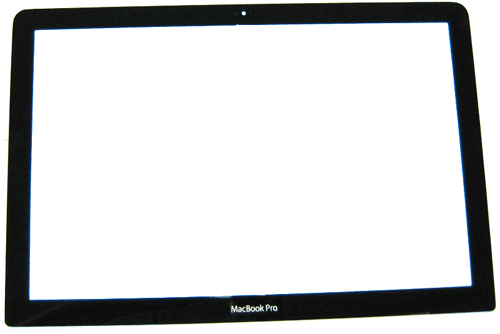 13” Macbook Pro Glass - $59.95 |
15” Macbook Pro Glass - $69.95 |
If you take your Macbook to most repair companies with a cracked display, they’ll undoubtedly say you need to replace the entire display assembly and charge you some astronomical figure. It really isn’t an extremely difficult procedure to do yourself however, and so we’ve created the guide below to show you just how to do it.
The guide below is for the 13 Inch Macbook and Macbook Pro Unibody models. The 15 Inch procedure is similar, but not identical. We’ll have that guide available shortly.
If you’re not up for the repair, our Mac Service Center can do the job for you for $154.95 for a 15″ Macbook Pro, $154.95 for a 13″ Macbook or Macbook Pro, or $164.95 for a 17″ Macbook Pro.
The Procedure: (Video Format)
This text will be replaced
The Procedure: (Text and Photo Format)
Click on any photo to go to a higher detail photo.
To begin, use a heat gun to loosen the double sided adhesive strip that holds the glass in place. Use caution, and heat the glass in short segments as over heating can cause damage to your LCD.With the glass heated, place a strong suction cup on the glass and pull up and away from the glass.
If heated properly, you’ll be able to see a small gap between the glass and the and the rest of the display. Insert a thin piece of plastic such as a credit card or movie rental card into the opening. Work the piece of plastic in enough where it can be slid along the seem of the glass. This will break the adhesive strip holding the glass in place.Repeat this procedure along the entire edge of the glass assembly. When you meet resistance, heat the area and repeat.

Once you have used a hair dryer or heat gun to warm the adhesive strip, use a strong suction cup to begin to separate the glass from the display assembly.

Caution: When pulling up on the suction cup, you should have to exert some force. However, do not apply excessive force as this could crack your glass or LCD. When you meet resistance, heat the area and repeat. At a certain point the glass will easily come free from the rest of the display assembly. Set the glass to the side on a clean, dust free, surface.

Next, remove 4 philips head screws ( 2 on either side ) holding the LCD to the display frame. Then remove the 2 philips head screws at the bottom of the display.

Next remove the clutch cover by sliding it to the side and applying a gentle upward pressure.

Flip the display assembly forward, and the LCD will come free from the backing.

Gently work the LVDS cable out of the opening in the bottom of the display frame to remove the LCD from the display assembly.

All of the pieces of the Macbook Unibody Display Assembly
To reassemble, place the LCD back in the frame, and insert the LVDS cable backwards through the opening in the bottom the display frame. Then pull the cable through the opening. You can use a plastic pry tool to assist you in routing the cable. Be very careful with this cable as it can be easily damaged.
Line the bottom of the LCD up with the bottom frame, and slide it into the groove in the bottom frame. Then make sure the 6 screw holes are properly aligned. Replace the 6 philip head screws.
Before putting the glass back on, use a cloth to glean any dust or fingerprints from the LCD and glass panel.
So where do you get the glass and LCD?
Macbook 13 Inch Unibody
Glass Panel – $59.95
LCD Panel – $129.95
Macbook Pro 13 Inch Unibody
Glass Panel – $59.95
LCD Panel – $129.95
Macbook Pro 15 Inch Unibody
Glass Panel – $69.95
LCD Panel – $169.95
Tags: apple, display, glass, iPad 2, LCD, mac, Mac Service, Macbook, macbook glass, Macbook Pro, repair, screen
Posted in Mac Repair Guide Releases | 84 Comments »
This entry was posted
on Friday, September 25th, 2009 at 1:03 pm and is filed under Mac Repair Guide Releases.
You can follow any responses to this entry through the RSS 2.0 feed.
You can skip to the end and leave a response. Pinging is currently not allowed.
Leave a Reply
You must be logged in to post a comment.



You can replace just the glass. You don’t need to replace the entire clamshell.
Just to reassure myself… my macbook glass is cracked and spiderwebbed. It will come off in pieces. However, the lcd screen shows no sign of damage and works just fine. In fact I have been using it for months(and right now) but I just now came across your site. (You guys are great) I just ordered your glass repair. If the lcd shows no problems now, then it should not need to be replaced. Right? Thanks in advance.
If your LCD is working fine, then there is no need to replace it. In most cases, you only need to replace the glass.
I have a 13 inch macbook, but made a mistake by ordering the macbook pro 13 inch glass screen. Is there any difference? Can I just use the macbook pro glass?
They are the same. The only difference is the word Pro.
where can i get a heat gun? will hair dryer do?
where can I get a suction cup as illustrated?
how easy is it to damage lcd with heat gun?
Heat guns are available at most home improvement stores. A hair dryer may work but isn’t as powerful. Suction cups are available on our website. If you are not careful with a heat gun, then you can easily damage the LCD.
is there a visable differance for the glass screen or do you think it will void the warranty ( just replaceing the glass and not dissasembaling the whole computer)
There is not a visible difference. As far as warranty issues, you would have to check with Apple Care as we have no affiliation with Apple Care.
I’m broken my glass on macbook 13’3 unibody
in the russia this glass 7500rub= 250USD. bad….
Hi,
I would like to know if this 13″ Macbook Unibody screen would fit on an older Macbook 13″ White..I want to mod it
like the link below.
http://i37.tinypic.com/28aumg2.jpg
It will technically fit, but you’ll have a metal sliver on the top of the display from where the bezel doesn’t cover the LCD frame and you’ll also have metal exposed on the corners from where the later generation models were more square than rounded. You’ll also have uneven edges, but it will technically work.
I’m Perty sure just the glass is cracked on my 15 ” pro how can I b sure? Thanks in advance
If you don’t see dark blotches on the screen, then most likely the LCD is fine and you just need to replace the glass.
I have a late 2008 Macbook Unibody 13.3″. The glass i not broken. The adhesive strip on the bottom under the name Macbook is slipping. If I daily press a finger along the bottom egde, it will hold. If I forget a day or two it will slip. Some dust has managed to come in behind the glass. Most not visible when the LCD is lit. On larger speckle is however quite annoying. In the long run not satisfying and more dust can be expected I guess.
I am afraid that I have to take of the glass? You say it should be possible without disassembling the the casing and everything. I guess I would start with the bottom of the glass since it is where it slips, but I feel the space for manouvre is very thight if I start just there. Any suggestions? Two more questions. Can I use any adhesive strip or should I have you send them to me (europe) and please some clever advice for removing dust and cleaning the glass and the LCD. Hopefully I will never come there again.
Thanks in advance
with the bottom of teh glass
I’d remove the glass, clean it, and then replace the adhesive strips with new ones.
Great Advice
I have a MacBook Pro 17″ with a 15.3″ display that needs a new glass. The LCD still works fine. Does anybody know where I can find such a glass. I believe that the same instructions as for the 15″ model still apply. Thanks, Fred
If you have a 17″ Macbook Pro, then your LCD should be 17.1″. If your LCD is 15.3″, then you have a 15″ Macbook Pro. We sell the glass for the 13″, 15″ and 17″ Macbook models at our online store.
we have a 17″ macvook pro with anti glare display screen. Nom the display is scratched. display is fine but the scratch mark is viosible. I was wondering hpow can that be fiixed? Apple wants over $500.00. if I send my laptop to you what is the turn arround time and total cost.
if i want to do it is there any guide? one vodeo I watched shows to take out entire display apart and reinstall it. can I just install the glass?
@Bob – The part is $179.95 and labor is $95. You can give us a call at 1-866-726-3342, option 2 to speak to our repair department.
I’ve got a 13″ A1278 MacBook Pro, which had a small amount of plain water spilled over the keyboard area.
After drying etc…the laptop physically powers up correctly and seems to work in every way with the exception of the display which is definitely on (if I point a torch at the screen and look carefully, I can see everything from bootup to desktop correctly)
I’ve had a look at the cable & logic board connector and there seems to be a small amount of black on the cable pins which may/may not have been there beforehand.
In your opinion, could this be an LCD backlight fault (they don’t have inverters do they?) needing a new screen or maybe a cable fault or something else?
Thanks in advance!
@John – With liquid damage it is hard to tell. It could be the logic board or the Display. We do offer a free diagnosis service if you wanted to send the machine in to us to be professionally diagnosed.
Hi There, I was wondering if this procedure it is possible also with Macbook Pro 13″ late 2011 models.
Thanks
@ Diego – Yes, the procedure is the same.
I have vertical lines, about 1″ wide appearing on the right third of my 15″ unibody screen. They were intermittent at first, as I could apply pressure and they’d go away. If I follow your instructions to access the screen, is there a place where I may find an unseated portion of a cable or aspect of the LCD that I can reseat, or do you think I will need to replace the entire LCD display?
Thank you!
Bill on Vashon
@ Bill – You’ll have the replace the LCD to fix that issue.
I have
MacBook Pro 13.3″
Processor:2.4GHz Core 2 Duo (P8600)
Model #:A1278
Production Year:2010
and on screen there are 3 vertical thin lines appear ( Blue, Yellow and red ) constantly ( No blinking ) I see them constantly , what I need to replace and which parts I need to order from this website ( Please suggest tools also )
Thanks
Shreyas
@ shreyas – You likely need to replace your LCD to fix that issue.
I have a 2010 Macbook Pro model A1278. The screen (LCD and glass) is cracked, so I know I need to replace both parts.
Here’s my question: will ANY A1278 screen work, or does it HAVE to be a 2010 screen? Is the screen of a 2010 A1278 different than one for a 2008 A1278 (for example)?
Thanks
@ Peter – You need to get the display for your model year. Any screen will not work.
Do you need to remove the screen from the body of a MacBook Pro (15″, mid 2012) prior to changing the glass?
@ Kevin – No, you don’t have to remove the body.
Own a MacBook pro unibody 17″. Had screen bken issue. got an exact looking LCD assembly complete. but the lcd cable is different. How different? Well, the main connector(same fit on both)but is placed different. one is on the left side on original but right side on replacement. Now it appears the other 2 small connectors are not the same fit
Questions 1 How do I know specific cable for my mobo? obviously I’ll have to take the screen lcd apart to get to cable attached on the back. Just checking if there’s something I need to do 1st as this is my first try with MAC. I’m a pc guy.
@ bvalcourt – Sounds like you purchased the wrong screen. You need to get the right one for your model. You can use our Parts by serial system to get the correct part for your system.