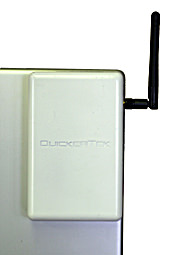
For all MacBooks, powerbooks and iBooks with wireless connectivity! Increase the range of your airport signal WITHOUT opening up your unit or voiding your warranty!
Two to three times the normal PowerBook
AirPort wireless network range and speed!
It really sounds too good to be true.
Wireless network
Not only can you connect to wireless networks that are further away
than ever before, but you also do it at higher speeds than previously
possible. And you don't have to do one thing any different after
you install it.
How much more flexibility would you have if you could sit five
times further away from your wireless network AirPort Base Station?
How would you like to sit with your PowerBook in the back yard,
maybe by the pool, and still connect and work at high speeds? Maybe
you have a special quiet room of the house or outside where you
can think and get away from the phone and all of the other distractions.
And, since PowerBook owners don't want to bother with a bunch of
extra steps to make anything work, you can instantly enjoy this
new antenna without any extra software. And no worries about voiding
your AppleCare warranty, since you don't have to open your PowerBook.
So how can you get five times the normal range with that tiny little
antenna? That little antenna has 200 milliwatts of RF power - the
rating that wireless products are measured by. Your PowerBook has
about 30 milliwatts of RF power packed into that sleek PowerBook
case. Not very impressive. Going from 30 to 200 milliwatts is what
gives you that extra range and speed. Impress those nerds in the
airport the next time you fly when you whip out your little PowerBook
Connect and start really hammering the wireless network in the terminal
building. You'll give those Windows guys wireless networking envy.
OK, so what about power? Is there a huge power brick to lug around?
We include a AC power adapter for those times when you're indoors
and and don't care that much about mobility. We also allow you to
use one of the USB ports to run your PowerBook Connect. You can
even run it on an optional internal battery. How's that for options?!
Want more options? How about using the PowerBook Connect with your
Apple PowerBook Pismo, Wallstreet, titanium, aluminum 12, 15 and
17-inch models and even the brand new MacBook Pro Intel laptops.
Not only can you connect to most PowerBooks, but you can also choose
any access point for your wireless connection.
You also can use any popular wireless network hardware include
access points from LinkSys, Belkin, dLink and of course, Apple AirPort
and AirPort Extreme Base Stations. That means just about any 802.11b
or 802.11g networks and your Mac OS X or later operating system.
You can even move your PowerBook Connect from your PowerBook to
any other WiFi ready computer - Mac or Windows.
QuickerTek's new PowerBook Connect combines a more powerful 2dBi
antenna than came in your stock PowerBook, with a new design that
does not require installation inside the PowerBook. You don't have
to open the computer and work with the innards. It simply attaches
to the PowerBook case, quickly and easily. And let's say that down
the road you want even more power, you can add one of QuickerTek's
antennas for even greater wireless performance - to connect to networks
up to a mile away!