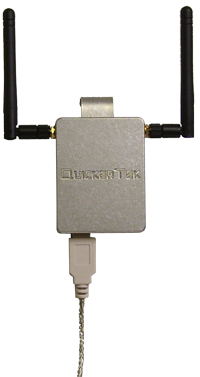
Featuring twin 500 mW transceivers, the Dualy is really a Quicky x2! Despite its incredible power the body of the Dualy only measures 2.25x3x.5". Powerful doesn’t have to mean inconvenient either, this device interfaces and is powered solely by your Mac’s USB port. Just like the nQuicky and Quicky this device clips on your PowerBook or MacBook’s display. With the generous USB extension cord, you can also put the Dually anywhere else you like.
Compatibility is virtually a non-issue with this device. Since it uses the USB standard, any Mac modern enough to run
OS X 10.3 (Panther or newer) and an available USB port can use it. This device has been tested under OS X 10.5 Leopard and is roaring to go. This device can connect to any 802.11 b/g/n networks but is best used in combination with an AirPort Extreme Base Station (802.11n).
To gain the speed and distance of 802.11 n (3x further range, 5x better speed) this device must be used in combination with an 802.11 n capable AirPort Base Station or Wireless Access Point (Router). This device will also adhere to 802.11 b & g wireless standards, operating at their respective speeds and ranges. Bear in mind as with all 802.11 n networks, the network will not be up to full speed with any b or g devices added in the mix (actual speeds vary depending on client computer’s wireless cards and type of AirPort/Router used).
*Please note, for full 802.11 N speed and range, all active wireless devices (including AirPort) must be 802.11 N Draft 2.0 compliant.
two 500 mw Amps. One for each antenna (Required for 802.11n 2.4ghz)
to get “N” results it must be connected to a “N” capable AirPort or Access Point.
will work on b,g, & n networks, will work with all AirPort Base Stations
equipped with two 3 dBi antennas
clips on the back of the computer
standard usb connection and includes extension cables
powered via USB only
works with OS X 10.3, 10.4, 10.5, and Windows XP or Vista.
AirPort card in your Mac is not required!
Works best for:
MacBook
MacBook Pro
iBook
PowerBook
Also works for any Mac with USB:
MacPro
iMac
PowerMac
G4 Cube
works with these Access points:
802.11 N Base Station Extreme (Square)
802.11 G Base Station Extreme (Saucer)
AirPort Express
WAPs from dLink, Belkin, LinkSys, etc.
All of our used parts are fully tested and in are in Grade A- to A condition unless stated otherwise. (Scratches possible, but no heavy wear or dents). Used parts designated with a Grade B condition may have slight damage such as small dents or deep scratches that are noticeable but should not affect the functionality of the device. Used parts designated as Non-Working will be parts that will need additional repair in order to be functional. This may include physical or liquid damage. All of our parts (new and used) come with a one year warranty direct from us.
Product Compatibility
Submit your device's serial number or model number to check for compatibility using our built-in system. These devices will be saved for future visits as well.
Self-Install Guides and Videos
We have a large selection of free take apart and installation guides on our repair guide page: Mac Repair Guides .
Related Products
Customers who bought this product also bought the following products: This does not necessarily mean these products are compatible with your device.
This part is no longer available.
Description
Featuring twin 500 mW transceivers, the Dualy is really a Quicky x2! Despite its incredible power the body of the Dualy only measures 2.25x3x.5". Powerful doesn’t have to mean inconvenient either, this device interfaces and is powered solely by your Mac’s USB port. Just like the nQuicky and Quicky this device clips on your PowerBook or MacBook’s display. With the generous USB extension cord, you can also put the Dually anywhere else you like.
Compatibility is virtually a non-issue with this device. Since it uses the USB standard, any Mac modern enough to run
OS X 10.3 (Panther or newer) and an available USB port can use it. This device has been tested under OS X 10.5 Leopard and is roaring to go. This device can connect to any 802.11 b/g/n networks but is best used in combination with an AirPort Extreme Base Station (802.11n).
To gain the speed and distance of 802.11 n (3x further range, 5x better speed) this device must be used in combination with an 802.11 n capable AirPort Base Station or Wireless Access Point (Router). This device will also adhere to 802.11 b & g wireless standards, operating at their respective speeds and ranges. Bear in mind as with all 802.11 n networks, the network will not be up to full speed with any b or g devices added in the mix (actual speeds vary depending on client computer’s wireless cards and type of AirPort/Router used).
*Please note, for full 802.11 N speed and range, all active wireless devices (including AirPort) must be 802.11 N Draft 2.0 compliant.
two 500 mw Amps. One for each antenna (Required for 802.11n 2.4ghz)
to get “N” results it must be connected to a “N” capable AirPort or Access Point.
will work on b,g, & n networks, will work with all AirPort Base Stations
equipped with two 3 dBi antennas
clips on the back of the computer
standard usb connection and includes extension cables
powered via USB only
works with OS X 10.3, 10.4, 10.5, and Windows XP or Vista.
AirPort card in your Mac is not required!
Works best for:
MacBook
MacBook Pro
iBook
PowerBook
Also works for any Mac with USB:
MacPro
iMac
PowerMac
G4 Cube
works with these Access points:
802.11 N Base Station Extreme (Square)
802.11 G Base Station Extreme (Saucer)
AirPort Express
WAPs from dLink, Belkin, LinkSys, etc.
All of our used parts are fully tested and in are in Grade A- to A condition unless stated otherwise. (Scratches possible, but no heavy wear or dents). Used parts designated with a Grade B condition may have slight damage such as small dents or deep scratches that are noticeable but should not affect the functionality of the device. Used parts designated as Non-Working will be parts that will need additional repair in order to be functional. This may include physical or liquid damage. All of our parts (new and used) come with a one year warranty direct from us.
Product Compatibility
Submit your device's serial number or model number to check for compatibility using our built-in system. These devices will be saved for future visits as well.
Self-Install Guides and Videos
We have a large selection of free take apart and installation guides on our repair guide page: Mac Repair Guides .
Related Products
Customers who bought this product also bought the following products: This does not necessarily mean these products are compatible with your device.