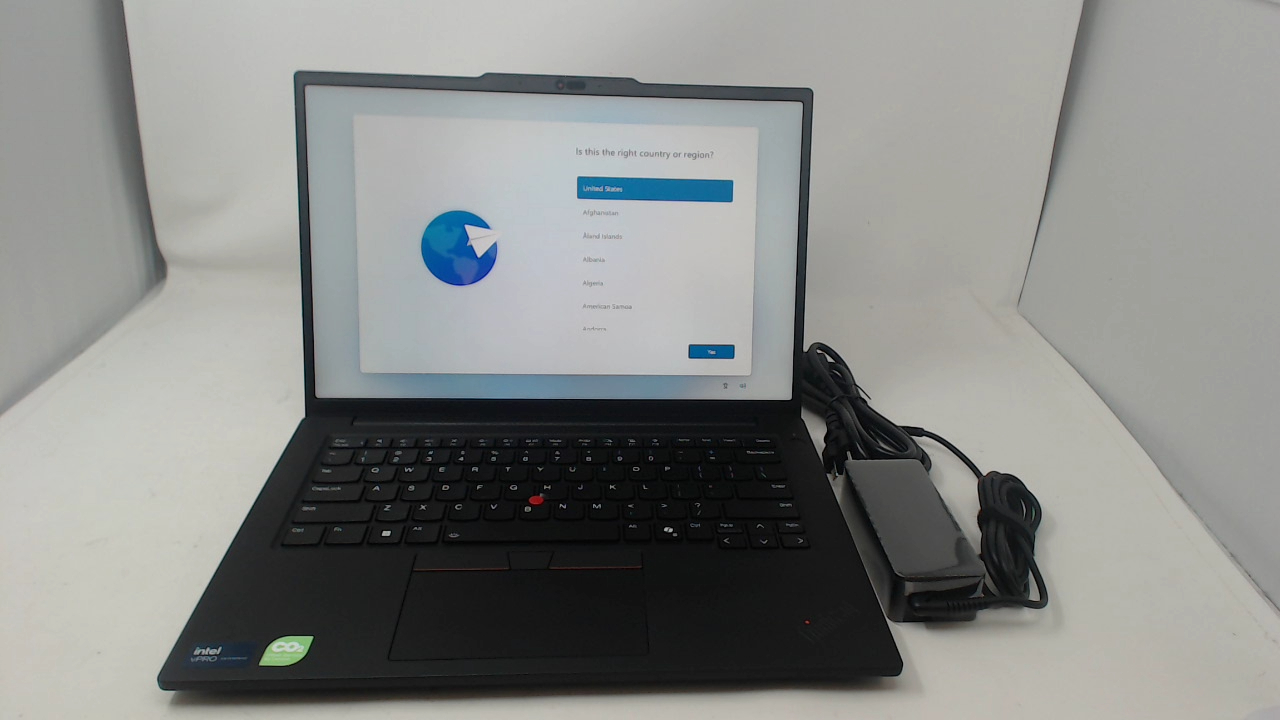
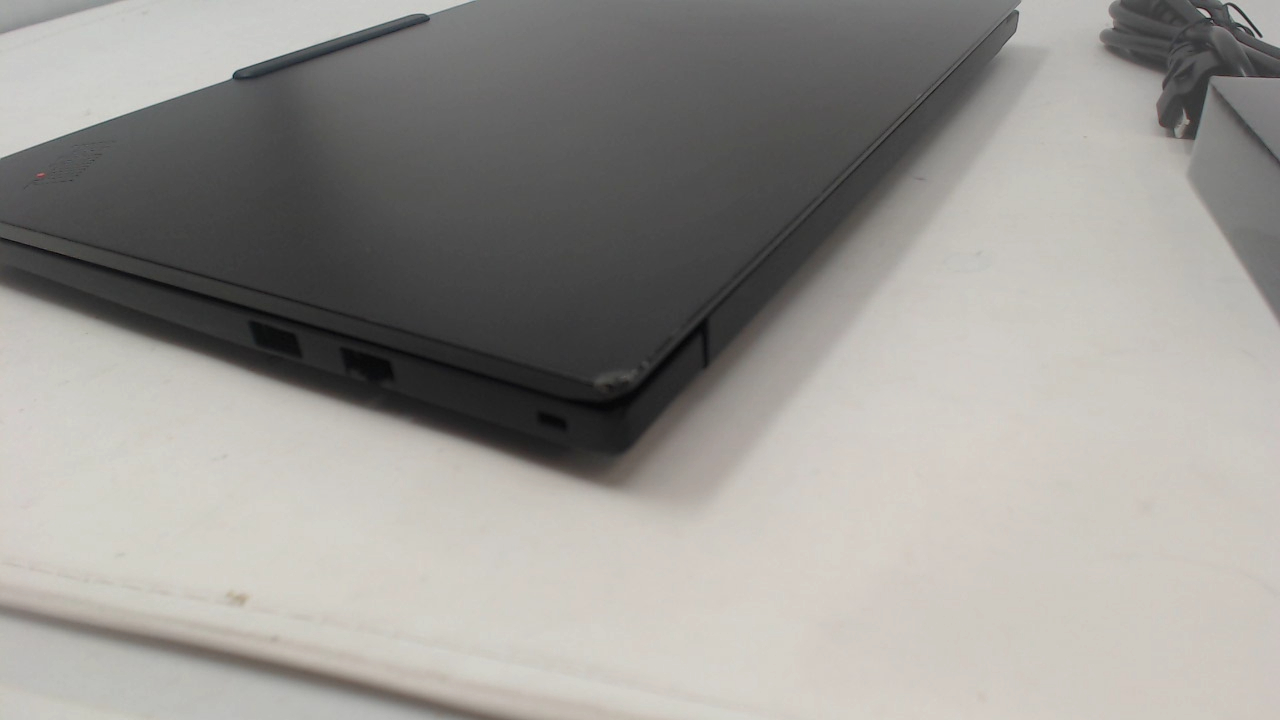
Includes laptop and power adapter only. No other accessories are included. If an optional upgrade is not specified, assume it is not included. Display case has light wear such as scratches, scuffs, and nicks including along edges. Display has light wear such as scratches and scuffs from keyboard. Keyboard and trackpad have light wear such as scratches and scuffs. Topcase has light wear such as scratches, scuffs, and nicks including along edges. Bottom pan has light wear such as scuffs and scratches. Unit is functional. DISPLAY LID AND TOPCASE has small dent along the edge on right side (see image).
Includes laptop and power adapter only. No other accessories are included. If an optional upgrade is not specified, assume it is not included. Display case has light wear such as scratches, scuffs, and nicks including along edges. Display has light wear such as scratches and scuffs from keyboard. Keyboard and trackpad have light wear such as scratches and scuffs. Topcase has light wear such as scratches, scuffs, and nicks including along edges. Bottom pan has light wear such as scuffs and scratches. Unit is functional. DISPLAY LID AND TOPCASE has small dent along the edge on right side (see image).
All of our used parts are fully tested and in are in Grade A- to A condition unless stated otherwise. (Scratches possible, but no heavy wear or dents). Used parts designated with a Grade B condition may have slight damage such as small dents or deep scratches that are noticeable but should not affect the functionality of the device. Used parts designated as Non-Working will be parts that will need additional repair in order to be functional. This may include physical or liquid damage. All of our parts (new and used) come with a one year warranty direct from us.
Product Compatibility
Submit your device's serial number or model number to check for compatibility using our built-in system. These devices will be saved for future visits as well.
Self-Install Guides and Videos
We have a large selection of free take apart and installation guides on our repair guide page: Mac Repair Guides .
Related Products
Customers who bought this product also bought the following products: This does not necessarily mean these products are compatible with your device.
Description
Includes laptop and power adapter only. No other accessories are included. If an optional upgrade is not specified, assume it is not included. Display case has light wear such as scratches, scuffs, and nicks including along edges. Display has light wear such as scratches and scuffs from keyboard. Keyboard and trackpad have light wear such as scratches and scuffs. Topcase has light wear such as scratches, scuffs, and nicks including along edges. Bottom pan has light wear such as scuffs and scratches. Unit is functional. DISPLAY LID AND TOPCASE has small dent along the edge on right side (see image).
Includes laptop and power adapter only. No other accessories are included. If an optional upgrade is not specified, assume it is not included. Display case has light wear such as scratches, scuffs, and nicks including along edges. Display has light wear such as scratches and scuffs from keyboard. Keyboard and trackpad have light wear such as scratches and scuffs. Topcase has light wear such as scratches, scuffs, and nicks including along edges. Bottom pan has light wear such as scuffs and scratches. Unit is functional. DISPLAY LID AND TOPCASE has small dent along the edge on right side (see image).
All of our used parts are fully tested and in are in Grade A- to A condition unless stated otherwise. (Scratches possible, but no heavy wear or dents). Used parts designated with a Grade B condition may have slight damage such as small dents or deep scratches that are noticeable but should not affect the functionality of the device. Used parts designated as Non-Working will be parts that will need additional repair in order to be functional. This may include physical or liquid damage. All of our parts (new and used) come with a one year warranty direct from us.
Product Compatibility
Submit your device's serial number or model number to check for compatibility using our built-in system. These devices will be saved for future visits as well.
Self-Install Guides and Videos
We have a large selection of free take apart and installation guides on our repair guide page: Mac Repair Guides .
Related Products
Customers who bought this product also bought the following products: This does not necessarily mean these products are compatible with your device.