We are only able to ship loose batteries via domestic ground services such as UPS Ground. We can not ship loose batteries internationally or by Air services within the US.
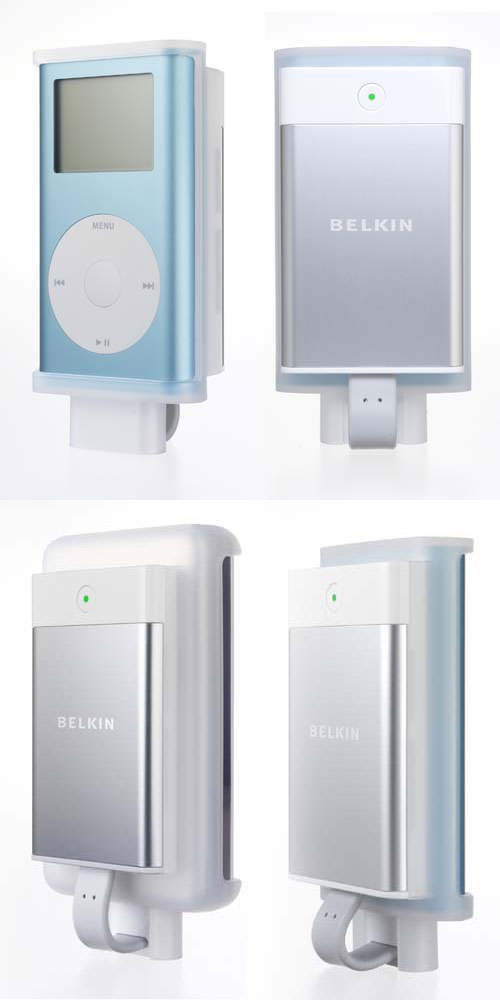
The TunePower Rechargeable Battery Pack from Belkin lets you keep the music playing on your iPod — even when the internal battery is drained. It's a great solution for long plane flights, hikes, or for anytime you don't have access to an AC outlet. For your convenience, we've included three sleeves sized to fit all iPod and iPod mini players with dock connectors. The TunePower provides 8–10 hours of additional play time* on all iPod models, and it features a power-level indicator, so you can tell when your batteries are running low. The compact design fits easily in your pocket, handbag, or briefcase, so you'll never be caught without your tunes again.
The detachable DC/FireWire cable, when used with the Apple AC wall charger included with your iPod or any FireWire port, will charge BOTH the iPod and the TunePower simultaneously. The TunePower also features a protective case design to prevent dirt, dust, or impact from damaging the connector.
Benefits
Works with all iPod or iPod mini players with dock connectors
Provides 8–10 hours of additional play time*
Lets you continue listening to your iPod when the internal battery is drained
Features a power-level indicator so you can monitor when batteries are low
Includes 3 sleeve sizes to fit securely on all iPod and iPod mini players
Fits easily in your pocket, purse, or briefcase
Comes with detachable DC/FireWire cable to charge iPod and TunePower simultaneously when used with the Apple iPod AC power brick or any laptop or PC with a FireWire port TunePower Battery
Shields the connector from damage with a protective case design
Offers a convenient alternative when you don't have access to AC outlets
Features a 2-Cell Lithium Ion Battery which offers cost-savings and convenience of recharging
Comes with a Belkin 3-Year Warranty
* Performance may vary based on Apple iPod firmware version in use.
Product Compatibility
Submit your device's serial number or model number to check for compatibility using our built-in system. These devices will be saved for future visits as well.
Self-Install Guides and Videos
We have a large selection of free take apart and installation guides on our repair guide page: Mac Repair Guides .
Related Products
Customers who bought this product also bought the following products: This does not necessarily mean these products are compatible with your device.
This part is no longer available.
Description
The TunePower Rechargeable Battery Pack from Belkin lets you keep the music playing on your iPod — even when the internal battery is drained. It's a great solution for long plane flights, hikes, or for anytime you don't have access to an AC outlet. For your convenience, we've included three sleeves sized to fit all iPod and iPod mini players with dock connectors. The TunePower provides 8–10 hours of additional play time* on all iPod models, and it features a power-level indicator, so you can tell when your batteries are running low. The compact design fits easily in your pocket, handbag, or briefcase, so you'll never be caught without your tunes again.
The detachable DC/FireWire cable, when used with the Apple AC wall charger included with your iPod or any FireWire port, will charge BOTH the iPod and the TunePower simultaneously. The TunePower also features a protective case design to prevent dirt, dust, or impact from damaging the connector.
Benefits
Works with all iPod or iPod mini players with dock connectors
Provides 8–10 hours of additional play time*
Lets you continue listening to your iPod when the internal battery is drained
Features a power-level indicator so you can monitor when batteries are low
Includes 3 sleeve sizes to fit securely on all iPod and iPod mini players
Fits easily in your pocket, purse, or briefcase
Comes with detachable DC/FireWire cable to charge iPod and TunePower simultaneously when used with the Apple iPod AC power brick or any laptop or PC with a FireWire port TunePower Battery
Shields the connector from damage with a protective case design
Offers a convenient alternative when you don't have access to AC outlets
Features a 2-Cell Lithium Ion Battery which offers cost-savings and convenience of recharging
Comes with a Belkin 3-Year Warranty
* Performance may vary based on Apple iPod firmware version in use.
Product Compatibility
Submit your device's serial number or model number to check for compatibility using our built-in system. These devices will be saved for future visits as well.
Self-Install Guides and Videos
We have a large selection of free take apart and installation guides on our repair guide page: Mac Repair Guides .
Related Products
Customers who bought this product also bought the following products: This does not necessarily mean these products are compatible with your device.